

How to identify your BMW iDrive or Audi MMI version
Before ordering a CarPlay module, an activation or a new screen, the most important thing is not the car's year but the version of its multimedia system. This guide shows how to recognise BMW iDrive (CCC, CIC, NBT, NBT EVO) and Audi MMI (2G, 3G, 3G+, RMC, MIB) systems in a few minutes and which solution suits each one.
Key takeaways
- The right CarPlay solution depends on the multimedia version, not the model year – in transition years the same model can have different systems.
- A BMW system can usually be identified by the main menu, the iDrive controller buttons and the screen connector.
- The most reliable way to tell Audi MMI 3G from 3G+ is the software name in "Version information": BNav, HNav or HN+.
- BMW NBT EVO and Audi MIB2 often only need a software CarPlay activation, while CIC, NBT, MMI 2G and 3G need a CarPlay module.
- The quickest way is to send us a photo of the switched-on screen – we identify the version free of charge.
Why the version matters
BMW and Audi often changed their multimedia systems in the middle of a model's production. A 2012–2013 BMW 5 Series F10, for example, can have either CIC or NBT, and a 2016 car either NBT or NBT EVO. The screen connectors differ as well: a CIC screen uses a 4-pin LVDS connector, NBT and NBT EVO a 6-pin one. That is why we always check the exact system before an order.
BMW iDrive: CCC, CIC, NBT or NBT EVO
BMW iDrive has changed several times. Below are the main signs that let you recognise the system yourself. The years are approximate: in transition years BMW fitted different systems even in the same model.
| System | Approx. years | How to recognise it | What usually fits |
|---|---|---|---|
| M-ASK | ~2004–2009 | Smaller screen without Professional navigation, simple menu with items around the centre | Android head unit |
| CCC | ~2004–2009 | Wide screen, menu items arranged in a cross around the centre, grey or brownish background; controller with a single MENU button | CarPlay module or Android head unit |
| CIC | ~2008–2013 | Menu list on the left with a bright highlight; controller with MENU, BACK, OPTION, CD, RADIO, TEL, NAV buttons; 4-pin screen connector | CarPlay module for CIC |
| NBT | ~2012–2016 | Similar to CIC but a more modern menu with smooth transitions; controller often with a touch surface; 6-pin screen connector | CarPlay module for NBT |
| NBT EVO ID4 | ~2016–2017 | List-style menu similar to NBT, but the system is already EVO | Often a software activation |
| NBT EVO ID5 / ID6 | ~2016–2020 | Main menu made of large horizontal tiles; ID6 with live tiles (map, media) | Usually a software activation |
| MGU (iDrive 7) | from ~2019 | Live Cockpit screens, the latest interface | CarPlay is often already there or enabled by software |

The screen connector – the most reliable sign in transition years
If the car was built in 2012–2013, CIC and NBT can be told apart reliably by the connector on the back of the screen: 4 pins – CIC, 6 pins – NBT. This matters when choosing both a CarPlay module and a new Android screen.
How to check the BMW software version
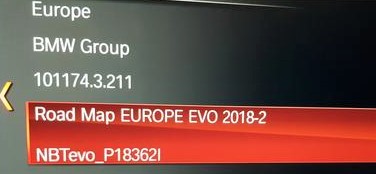
On NBT EVO systems the exact name can be found in the system information, for example on the software or navigation map version screen. A line starting with "NBTevo_" means an NBT EVO system. Menu names differ by version and language, so if you cannot find this screen, a photo of the main menu is enough.
More BMW solutions are on our BMW multimedia page.
Audi MMI: 2G, 3G, 3G+, RMC or MIB
Audi MMI systems can be recognised by the screen and controls, but the most accurate way is the software name in the system information. Again, the years are approximate and vary by model.
| System | Approx. years | How to recognise it | What usually fits |
|---|---|---|---|
| MMI 2G Basic / High | ~2004–2009 | Basic – smaller screen, usually without navigation; High – 7″ screen with DVD navigation; version shown as "SW: …" | CarPlay module for 2G |
| MMI 3G Basic | ~2008–2011 | 6.5″ screen; software starts with "BNav" | CarPlay module for 3G |
| MMI 3G High | ~2009–2012 | 7″ screen, hard-drive navigation; software starts with "HNav" | CarPlay module for 3G |
| MMI 3G+ (Plus) | ~2010–2018 | 7″ screen, often Google Earth maps; software starts with "HN+" or "HN+R" | CarPlay module for 3G+ |
| MMI RMC | ~2011–2018 | Simpler system (e.g. A1, Q3, A6 C7), often a 6.5″ screen; software starts with "RMC" | CarPlay module for RMC |
| Concert / Symphony | ~2008–2016 | Radio without navigation (A4, A5, Q5), "Concert" or "Symphony" on the unit, 6.5″ screen | Module for Concert / Symphony |
| MIB / MIB2 | from ~2013 | Newer system (e.g. A3 8V, A4 B9, Q7 4M); version shown in the engineering menu | Often a software activation |
How to check the Audi MMI 2G, 3G and 3G+ version
Press SETUP or MENU, choose "Settings" and scroll down to "Version information". Look at the software version line:
- BNav… – MMI 3G Basic
- HNav… – MMI 3G High
- HN+… or HN+R… – MMI 3G+
- RMC… – MMI RMC
- SW: … – MMI 2G
How to check the Audi MIB version
On MIB systems the version is shown in the engineering menu. Hold the button combination for your model for about 15 seconds, then choose "System version information". The combination differs by model – see the image below. Do not change anything in the engineering menu: just read the version and exit with the same combination.

Which CarPlay solution fits your system
See our CarPlay and Android Auto modules, CarPlay activation services, Android head units and wireless adapters. We compare a module with a new screen in detail in Android head unit or CarPlay module, and all the ways to add CarPlay in How to add Apple CarPlay to an older car.
What to send us to identify the version
Not sure which system you have?
Send a photo of the switched-on screen and your car model – we identify the version free of charge and suggest the right solution with a price.
Send a photo →Frequently asked questions
Can the version be identified by the model year alone?
Not always. In transition years (e.g. BMW 2012–2013 and 2016) the same model can have different systems, so it is more accurate to check the menu, controller, screen connector or software version.
How do I tell BMW CIC from NBT?
By the menu and the controller (the NBT controller often has a touch surface), and most accurately by the screen connector: CIC has a 4-pin and NBT a 6-pin LVDS connector.
How do I tell BMW NBT EVO ID4 from ID5 and ID6?
The ID4 menu looks like a list similar to NBT, while the ID5 and ID6 main menu is made of large horizontal tiles. A software CarPlay activation suits most of these systems.
Where do I find the Audi MMI version?
On MMI 2G, 3G and 3G+ – via SETUP or MENU → Settings → Version information. On MIB systems the version is shown in the engineering menu.
What do BNav, HNav and HN+ mean?
They are Audi MMI 3G software names: BNav – 3G Basic, HNav – 3G High, HN+ or HN+R – 3G+.
Should I order a module if I don't know the exact version?
Better not. Send a photo of the switched-on screen and your car model – we check the version free of charge and suggest the right solution.
Conclusion
Your BMW iDrive or Audi MMI version decides whether your car needs a CarPlay module, a software activation or a new screen. The system can usually be recognised by the menu and the controller, and most accurately by the screen connector (BMW) or the software name (Audi).
If in doubt, don't guess – send us a photo of the screen. We identify the version free of charge and suggest the right solution with a price.