

Android Head Unit or CarPlay Module: Which Should You Choose?
Want Apple CarPlay and Android Auto in your car, but not sure whether to keep the factory screen and add a CarPlay module, or replace it with a new Android head unit? In this guide we compare both options: how they differ, what they cost and when each one is the better fit.
Key takeaways
- A CarPlay module keeps the factory screen, menus and controls – Apple CarPlay and Android Auto are added as an extra source.
- An Android head unit replaces the factory screen with a new, larger touchscreen with Google Play apps and wireless CarPlay.
- If the factory screen is good and you want an OEM look, a module is usually the better choice.
- If the screen is small, outdated, not touch-enabled or missing, an Android head unit is the better fit.
- Prices are similar: CarPlay modules usually cost €300–500, Android head units €330–1000.
Short answer
What is a CarPlay module and who is it for?

A CarPlay module is a small box connected behind the factory screen, between the head unit and the display. The factory menu, radio, reverse camera, steering wheel buttons and the iDrive, MMI or COMAND controller work as before, while Apple CarPlay and Android Auto are added as an extra source. You can return to the original menu with one button.
Advantages: the interior looks factory-original, car settings do not change, and CarPlay is controlled with the factory controller or buttons. Most modules support wireless and wired CarPlay and Android Auto, and they connect with plug-and-play connectors, so the car can always be returned to factory condition.
Limitations: screen size and resolution stay the same, so in cars with a small screen the picture will be small. Audio is sent via AUX, AMI or the factory Bluetooth channel – some cars need an extra setting for this. More in the article CarPlay integration with AUX or MOST connection.
Browse CarPlay and Android Auto modules for the factory screen.
What is an Android head unit and who is it for?
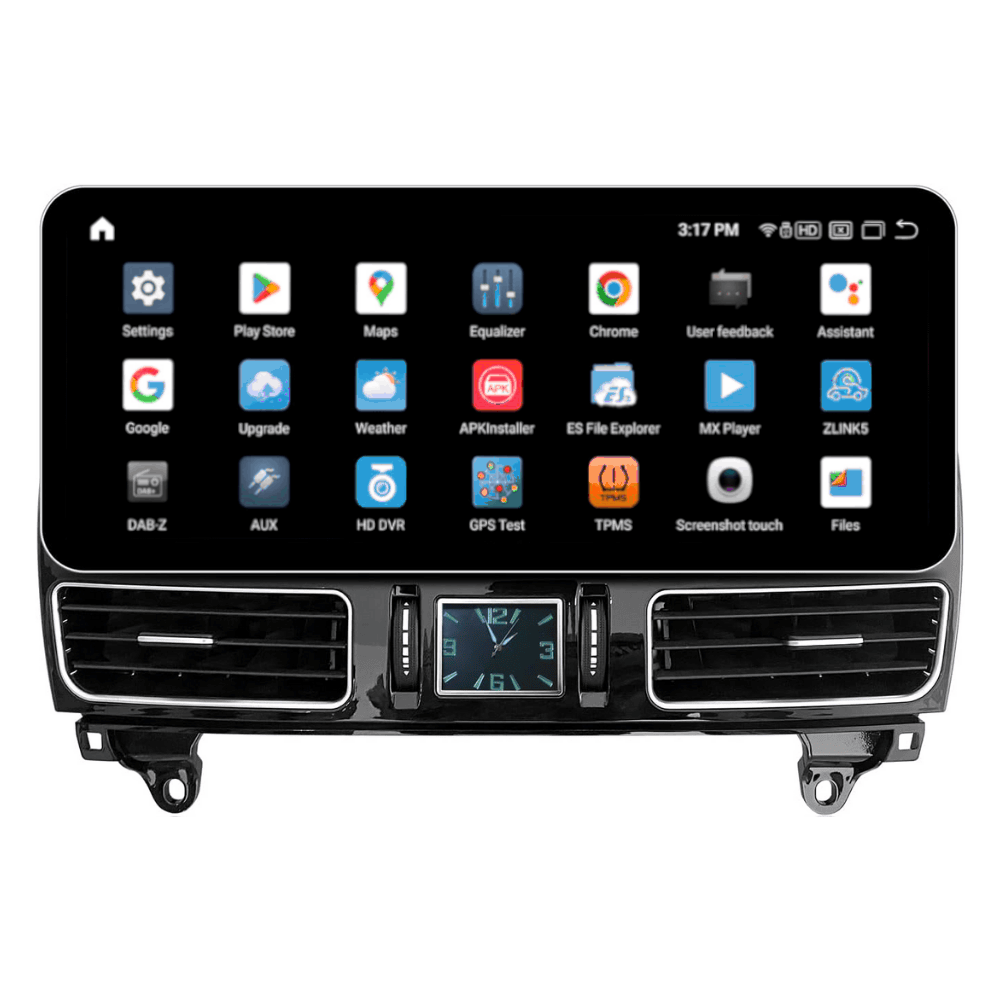
An Android head unit is a model-specific touchscreen installed in place of the factory screen with a matching frame. It runs Android 13 or Android 14, so you can install Waze, Spotify, YouTube and other apps from Google Play and use them even without connecting your phone. Apple CarPlay and Android Auto work wirelessly.
The most common sizes are 10.25" and 12.3", and the systems we offer have 8 GB of RAM and 128 GB of storage. Most of them keep the factory camera, steering wheel buttons and some of the car settings, and many have a SIM card slot for mobile internet and a built-in DSP for sound adjustment.
Limitations: the interior look changes, and the Android menu is often controlled by touch only, not with the factory controller. 360° cameras sometimes need an extra module. Before buying, it is worth checking which factory functions will be kept in your specific model.
Browse Android head units.
CarPlay module vs Android head unit: comparison
| Criterion | CarPlay module | Android head unit |
|---|---|---|
| Screen | Factory, size and resolution unchanged | New 10.25–12.3″ touchscreen |
| Interior look | Fully factory | Changes, but with a model-specific frame |
| Apple CarPlay and Android Auto | Wireless and wired | Wireless and wired |
| Apps without phone | None | Google Play: Waze, Spotify, YouTube etc. |
| Factory menu | Unchanged | Usually kept, depends on the model |
| Controls | Factory controller and steering wheel buttons | Touch and steering wheel buttons |
| Reverse camera | Factory camera works as before | Supports factory or new camera |
| Audio | Via AUX, AMI or factory Bluetooth | Via factory audio system, with DSP settings |
| Installation | Behind the screen, plug and play | In place of the factory screen, plug and play |
| Approximate price | €300–500 | €330–1000 |
Calls and microphone: what to look out for
With a CarPlay module and the factory Bluetooth channel enabled, calls can go through the car's hands-free system and its factory microphone. We explain how to enable this in the article How to turn on the Bluetooth channel function in the module. Otherwise the module's external microphone is used.
An Android head unit can use the factory or an external microphone. If the other person hears you poorly, the most common reason is a badly placed microphone – for example, left behind the dashboard. It is best mounted closer to the driver, on the headliner or the A-pillar. If you install it yourself, test a call before reassembling the interior trim.
Examples by car
BMW with CIC or NBT. The factory screen is wide and good quality, so a CarPlay module is usually the right choice – iDrive control and the factory menu are kept. If the car has NBT EVO, first check whether software activation is enough.
Older BMWs with CCC or a small screen. A module works, but the picture on a small screen is small, so if you want a bigger screen an Android head unit is worth considering.
Mercedes with Audio 20 or COMAND (NTG 4.5, NTG 5). A module keeps the factory look and controller, while a 10.25" Android head unit suits you if you want a touchscreen and apps.
Lexus RX. The factory screen is operated with a controller, not by touch, so a 12.3" Android head unit is a popular choice. If you want to keep the factory look, a CarPlay module is the option.
How to choose the right option
We compared all the ways to add CarPlay in the guide How to add Apple CarPlay to an older car.
Not sure which to choose for your car?
Send us a photo of your head unit switched on and your car model – we will tell you whether a module or an Android head unit is the better fit and offer a solution with a price.
Send a photo →Installation and warranty
Both CarPlay modules and Android head units usually connect with plug-and-play connectors, so there is no need to cut the car's wiring, and everything can be returned to factory condition if needed. Installation requires removing interior trim, so if you have no experience we recommend professional installation.
Carplay.lt installs equipment in Kaunas, Lithuania (Europos pr. 85A), usually within one business day. Installation starts from €100 (Toyota, Volkswagen), €120 (BMW, Audi) and €150 (Lexus). All equipment comes with a 24-month warranty; we deliver within Lithuania in 1–2 business days and abroad in 3–7. If you install it yourself, we help by phone, email, WhatsApp or video call.
Frequently asked questions
Which is better – a CarPlay module or an Android head unit?
There is no single answer. A CarPlay module is better if you want to keep the factory screen, menu and controls. An Android head unit is better if you want a bigger touchscreen and apps that work without your phone.
Will Android Auto work with a CarPlay module?
Yes. Most CarPlay modules support both Apple CarPlay and Android Auto, wirelessly and wired.
Does Apple CarPlay work on an Android head unit?
Yes. On Android head units Apple CarPlay and Android Auto work wirelessly, and Google Play apps can also be used without a phone.
Will the factory reverse camera be kept?
With a CarPlay module the factory camera works as before. An Android head unit usually supports the factory camera, but 360° cameras sometimes need an extra module.
Which option is cheaper?
Prices are similar: CarPlay modules usually cost €300–500, Android head units €330–1000, depending on the model and screen size. Installation in Kaunas starts from €100.
Can the car be returned to factory condition?
Yes. Both options usually connect with plug-and-play connectors, so once the equipment is removed the car returns to factory condition.
How do I find out which option fits my car?
Send us a photo of your head unit switched on, plus your car model and year. We will identify the system version and suggest suitable options with prices.
Conclusion
A CarPlay module and an Android head unit both give you Apple CarPlay and Android Auto, but they take different approaches: a module adds to the factory system, while an Android head unit replaces it. If the factory screen is good and you want the interior to stay original, choose a module.
If the screen is small, outdated or not touch-enabled, or you want apps without your phone, an Android head unit is the better choice. Not sure? Send us a photo of your head unit – we will advise you for free.